Leftover Shizuku files may stop high-security and sensitive apps from launching. I recently experienced a similar problem when trying to launch PE Census, a security-sensitive app used for census-related work. The app closed immediately after opening. After investigating the issue, I found a possible solution: removing the leftover shizuku_starter file from Android’s temporary directory using ADB.
If an Android device is rooted or has Developer Options enabled, apps in the following categories may consider it an untrusted environment due to potential risks from malicious automation, accessibility-service abuse, or unauthorized screen overlays, and may refuse to run.
- Banking and Personal Finance Apps
- Government and Citizen Identity Portals
- High-Security Mobile Games
- Public Transit and Digital Ticketing Platforms
- Corporate and Enterprise Management Software
Being a government employee, I recently installed the Census PE app. However, whenever I launched it, the splash screen appeared briefly before the app closed automatically. Knowing that it handles sensitive government data, I ensured that Developer Options was disabled and uninstalled Shizuku. Despite taking these precautions, the app still refused to launch.
Don’t Miss: How to Set Up and Use Shizuku on Android
Diagnose Your Device Using SDKHelper
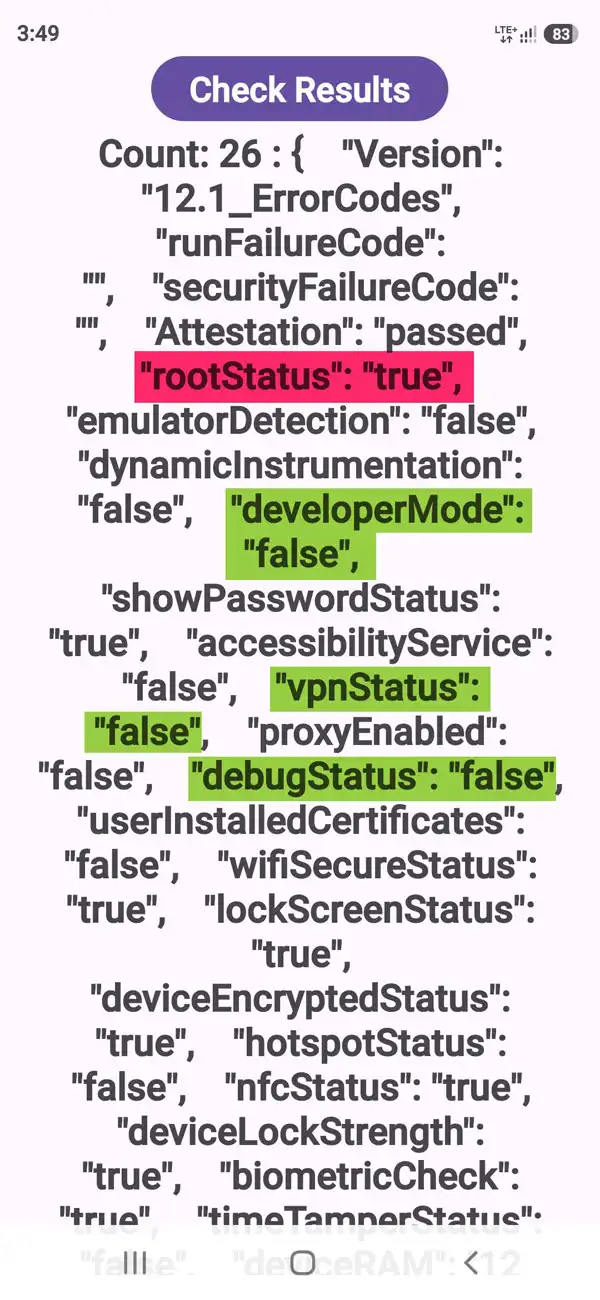
First, download the provided SDKHelper APK and install it on your Android phone. Open the app and check the RootStatus value.
- RootStatus: false — You don’t need this fix for the reported issue.
- RootStatus: true — If you have already uninstalled Shizuku and are experiencing the same problem, proceed to the next step.
Note: RootStatus: true alone does not prove that your device is rooted.
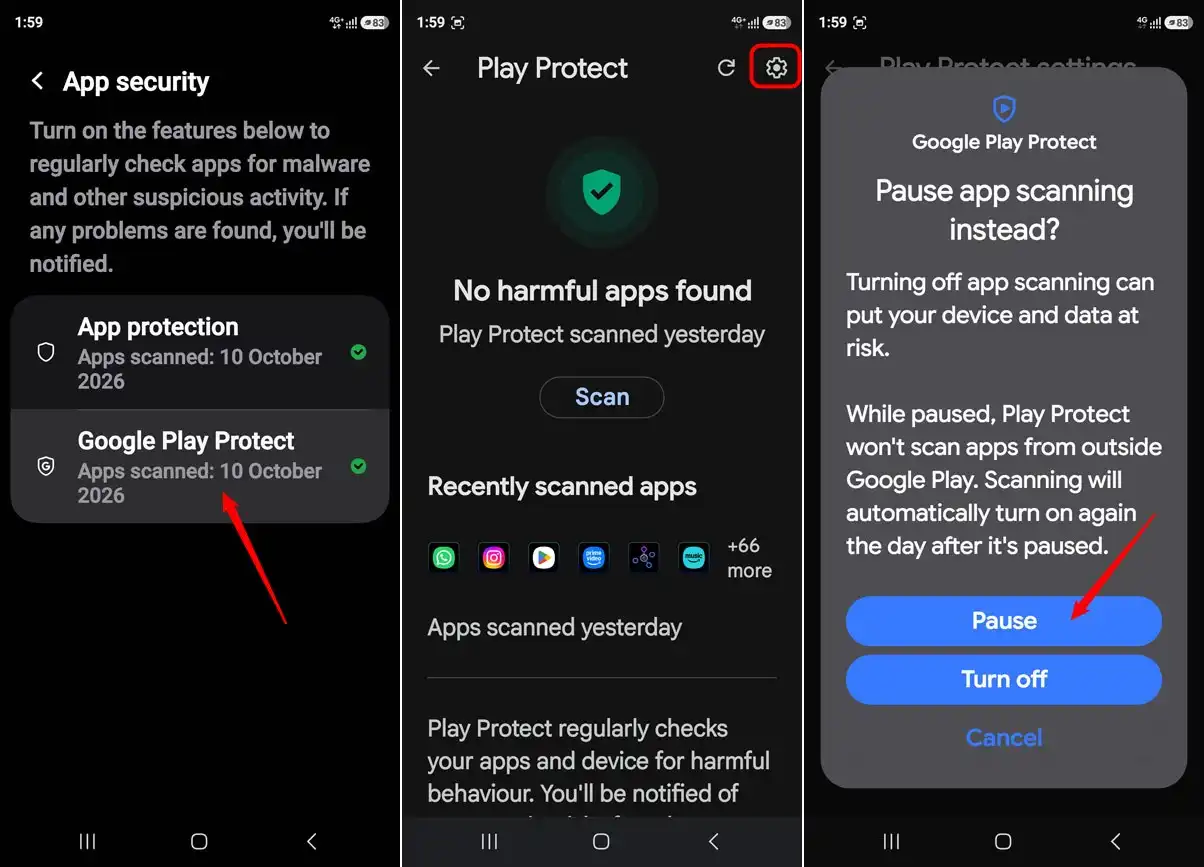
If Google Play Protect Blocks the APK
Google Play Protect may warn you about APKs downloaded outside Google Play. SDKHelper is a safe app, but you may need to disable settings like Google Play Protect and Auto Blocker (on Samsung) temporarily.
Since I had never rooted my device, I suspected that the issue might be related to Shizuku rather than actual root access. Uninstalling an app does not necessarily mean that every file it previously created has been removed.
Below is what I did to remove the “true” value for RootStatus using ADB commands.
Must Read: 80+ Best Shizuku Apps and Mods for Android
Using ADB to Remove the Leftover Shizuku File
- Before using ADB, you must enable Developer Options and USB debugging on your Android phone.
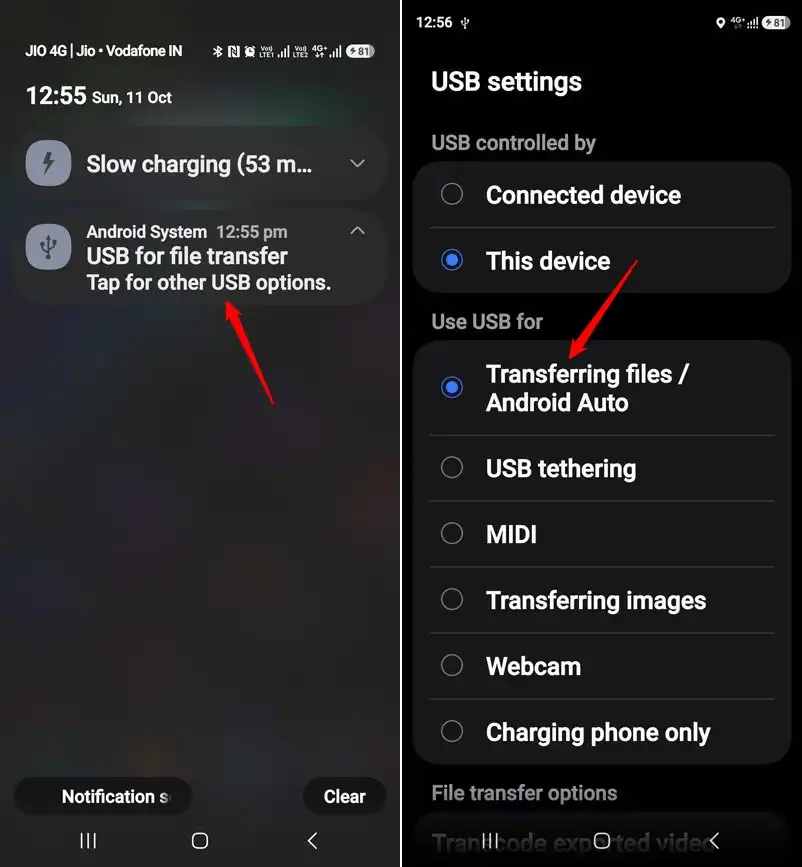
- Connect your Android device to your PC via a USB cable that supports data transfer. Do not forget to enable Transferring files/Android Auto in USB Settings.
- Download the official Android SDK Platform-Tools and extract the ZIP file on your desktop.
- Open the extracted folder containing
adb.exe, right-click an empty area, and select Open in Terminal.
- Run the following command to check whether your phone is connected:
adb devices
- At this moment, you’ll need to Allow USB debugging on your phone. Accept the authorization prompt.
- Once your device is listed as
device, enter the following commands one at a time:adb shell
cd /data/local/tmp
ls
- Check the directory listing for
shizuku_starter. If the file exists, execute:rm shizuku_starter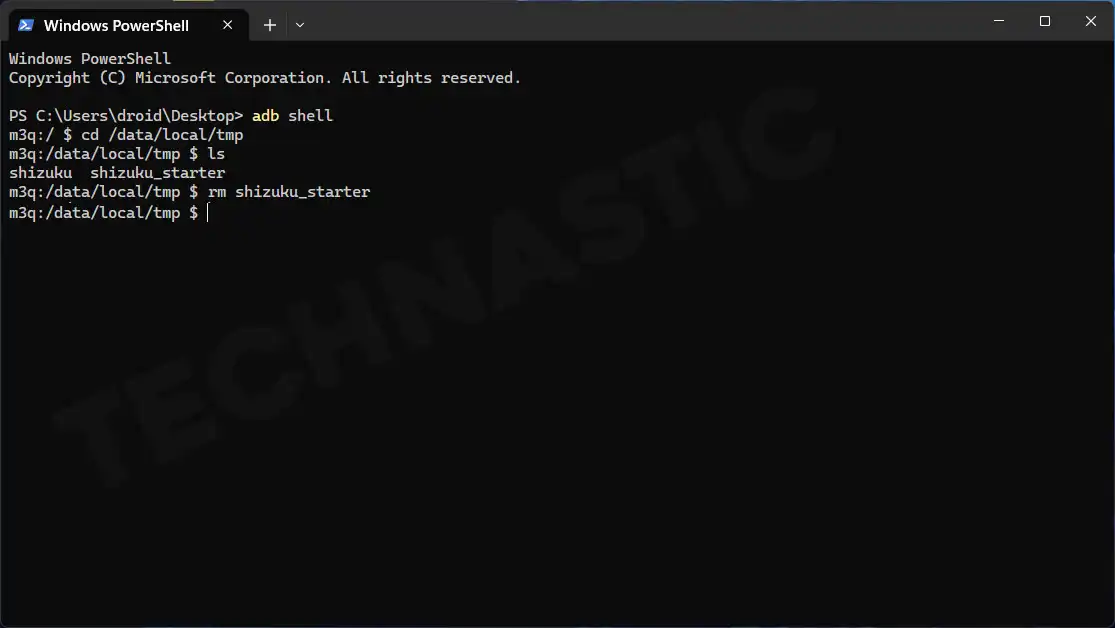
- To verify its removal, run:
ls -l shizuku_starter
If the file no longer exists, type exit to leave ADB Shell, disconnect your phone, and test SDKHelper and PE Census again.
In my case, removing this file resolved both the incorrect RootStatus: True result in SDKHelper and the issue that caused PE Census to close immediately after launch.
Note: If shizuku_starter is absent, do not proceed with deleting unrelated files. This fix may not apply to every device or app-launch issue.
Troubleshooting Common ADB Errors
ADB is not recognized as a command
Make sure you opened the terminal in the extracted Platform-Tools directory containing adb.exe. Alternatively, run .\adb.exe devices in Windows PowerShell.
The phone is not listed under ADB devices
Check USB debugging, the USB cable, the computer’s USB drivers, and the authorization prompt on your phone.
The file cannot be found
Make sure you entered the Android shell first and navigated to /data/local/tmp. Use ls to inspect the directory. If the file is absent, deleting it cannot resolve the issue.
SDKHelper still reports RootStatus: True
Removing shizuku_starter only removes that specific file. It does not establish whether the phone has root access, nor does it change every possible root-detection signal. Check for other causes rather than deleting unrelated system files.
The app still closes immediately
The problem may be unrelated to Shizuku. Check for app updates, device compatibility issues, and official support guidance. Do not disable security protections or modify the app to bypass its integrity checks.
Read Next: How to Run Shizuku Without Enabling Developer Options